
WeChat Bot
Scan once with WeChat to chat with a Halo Digital Human in your personal WeChat, no WeCom account needed. Direct chats only, and no owner or guest roles.
You connect it yourself, by clicking in Halo and scanning with WeChat on your phone; Halo can't connect it for you.
Before you start
- A personal WeChat account, with WeChat on your phone.
- A Digital Human that lives in a workspace; see Create a Digital Human.
- Halo running. The bot doesn't reply while Halo is closed or the computer sleeps; see Keep Digital Humans running.
How it differs from WeCom and Feishu bots
- Direct chats only: it can't be added to groups.
- No permission control: everyone who can message it is treated as the owner and can have the Digital Human do anything. Connect it only for yourself, or for people you trust.
- No replies that appear as they're written: each reply is sent once it's done.
If you need group chats or owner and guest permissions, use the WeCom Intelligent Bot or the Feishu Bot.
Connect from the Digital Human
- Click Digital Humans on the left rail, open the Digital Human that should answer in WeChat, and switch to Capabilities and settings.
- Under Messages & Notifications › Bot Access, click Scan to add a bot › WeChat bot to open "Add WeChat bot".
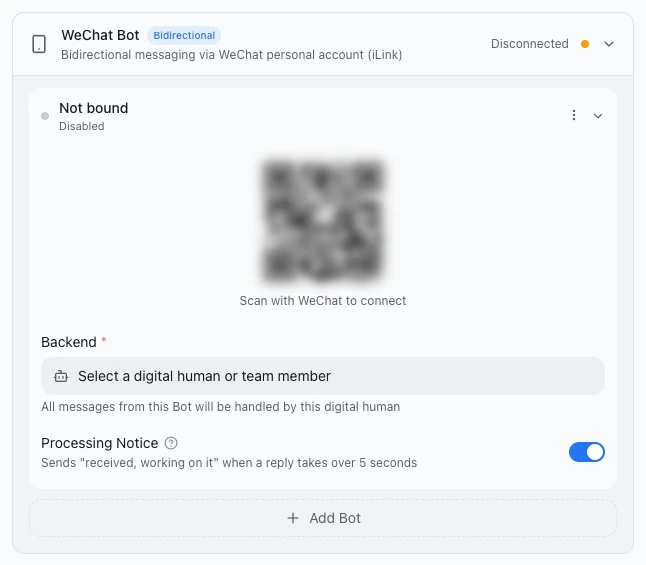
- Scan the QR code with WeChat on your phone ("Scan with WeChat to connect") and confirm on the phone. The dialog shows "Waiting for confirmation...", then "Connecting...", and closes once connected; the bot then appears in the Bot Access list.
- Send the bot a message in WeChat, and the Digital Human replies.
If the code expires, the dialog says "QR code expired"; click Retry for a new one (when connecting from Settings, the button is Refresh).
Done
The Digital Human replied to your message in WeChat. Under Settings › Message Channels, the bot shows Connected and the WeChat Bot card header shows "1 connected".
Connect from Settings
- Open Settings › Message Channels, find WeChat Bot and click Add Bot.
- In the new bot, click Connect WeChat, then scan with WeChat on your phone and confirm.
- Pick a Digital Human under Backend.
Disconnect
Click Disconnect in the bot's card; the bot then shows Disabled. The Digital Human stops receiving WeChat messages, and the connection credentials are cleared, so you'll need to scan again next time.
Limits
- Direct chats only.
- One message holds up to 4,000 characters; longer replies are split into several messages.
- It receives images, voice (as WeChat's transcript), files and video, up to 25 MB per file.
- It can reply to, or message, only people who have messaged it recently. After Halo restarts, a person must message the bot first before the Digital Human can message them again.
- The WeChat sign-in expires. When it does, the bot stops and you need to scan to connect again.
The Processing Notice is on by default: if there's no reply within 5 seconds, it first sends "已收到,正在处理…" ("Received, working on it…").
Troubleshooting
The bot shows "Not connected" or "Disabled"
- "Not connected": the WeChat sign-in expired. Click Connect WeChat and scan again.
- "Disabled": someone clicked Disconnect. Click Connect WeChat and scan again too.
Messages the Digital Human sends on its own don't arrive
Halo has restarted, or the person has never messaged the bot. Ask them to send the bot a message first; after that, sending works again.
For more, see Bot not replying.
Next steps
- Message channels overview: how the bots differ and how to use them.
- WeCom Intelligent Bot: use it when you need group chats and permission control.